Ruby Logo
Fridge2Table web app

Fridge2Table

UI/UX Design Product Design Wireframing User Research
Fridge2Table project

OVERVIEW:

Fridge2Table is a web app designed to help young people manage ingredients at home, track expiry dates, discover suitable recipes and organise grocery shopping in one connected experience.

CONCEPT:

The concept creates a continuous journey between storing, cooking and shopping, helping users make more intentional decisions about the food they already have.

DURATION:

4 Weeks

TOOLS:

Figma, FigJam, VS Code, Generative AI

ROLE:

User Research, UX/UI Design & Front-end Development


01. Overview

Fridge2Table - Smart Food Management Web App

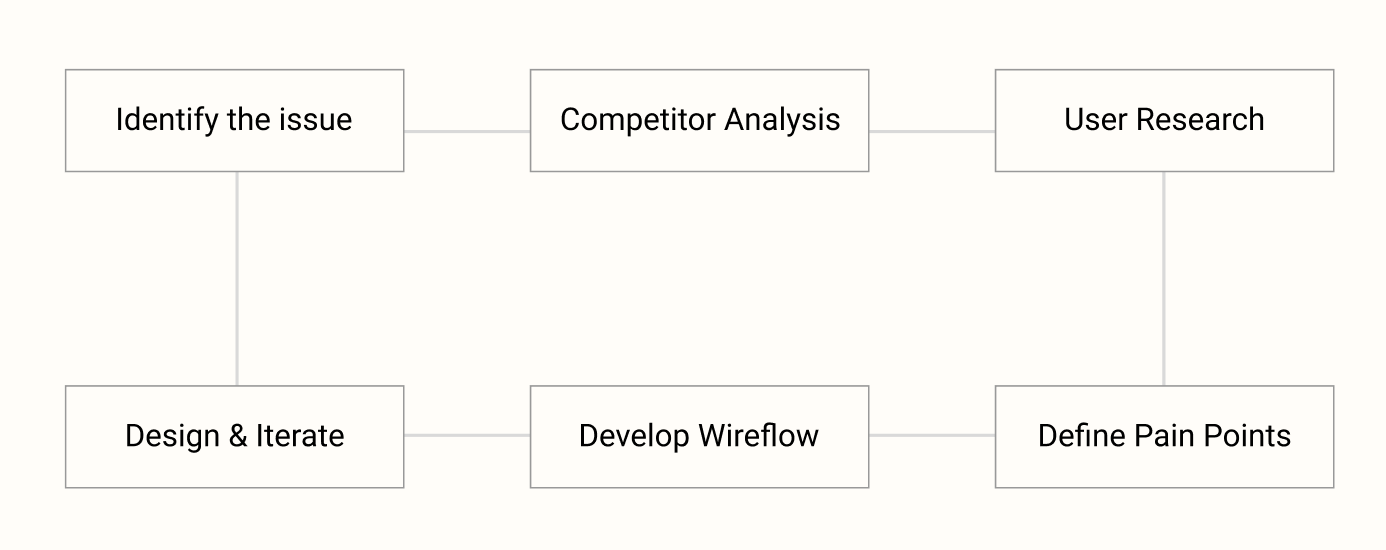
Driven by user research and competitor analysis, Fridge2Table explores the food management challenges faced by young people. The process identifies key issues around ingredients visibility, food waste and meal decisions, and translates these insights into a connected web app.

Fridge2Table design process

02. Background

Low Ingredient Visibility Leads to Food Waste

Young people often forget what ingredients they already have, making it difficult to use food before it expires. At the same time, deciding what to cook can require extra time and effort, especially when fridge contents are unclear, leading to repeated purchases, unused ingredients and unnecessary food waste.

“How might we make ingredients at home more visible and easier to manage, so users can reduce food waste?”

03. Competitor Analysis

Strengths

  • KitchenPal: All-in-one inventory, recipe and shopping ecosystem with expiry tracking.
  • SuperCook: Strong ingredient-first recipe discovery based on what users already have.
  • Cooklist: Combines pantry management, recipes and grocery shopping features.
  • XiaChuFang: Strong recipe content, cooking community and broad recipe discovery.

Opportunities

  • KitchenPal: Simplify inventory management and reduce ingredient-entry effort.
  • SuperCook: Add expiry-aware recommendations and lightweight freshness tracking.
  • Cooklist: Make pantry management faster and highlight ingredients that should be used first.
  • XiaChuFang: Connect recipe discovery with fridge inventory and available ingredients.

Weaknesses

  • KitchenPal: Broad functionality can make navigation and daily management feel complex.
  • SuperCook: Limited expiry and freshness tracking for existing ingredients.
  • Cooklist: More focused on shopping and meal planning than lightweight fridge management.
  • XiaChuFang: Limited fridge inventory and expiry management, with a high volume of content.

Threats

  • KitchenPal: Users may prefer simpler tools with lower maintenance effort.
  • SuperCook: Competes with food-management apps offering broader inventory features.
  • Cooklist: Users may prefer simpler recipe or shopping-list apps for everyday use.
  • XiaChuFang: Competes with food-management platforms offering stronger inventory tools.

Product Opportunity:

Create a lightweight food-management experience that helps users quickly see what they have, use ingredients before they expire and decide what to cook with minimal effort.


04. User Research

Research focus - Food Management & Everyday Cooking

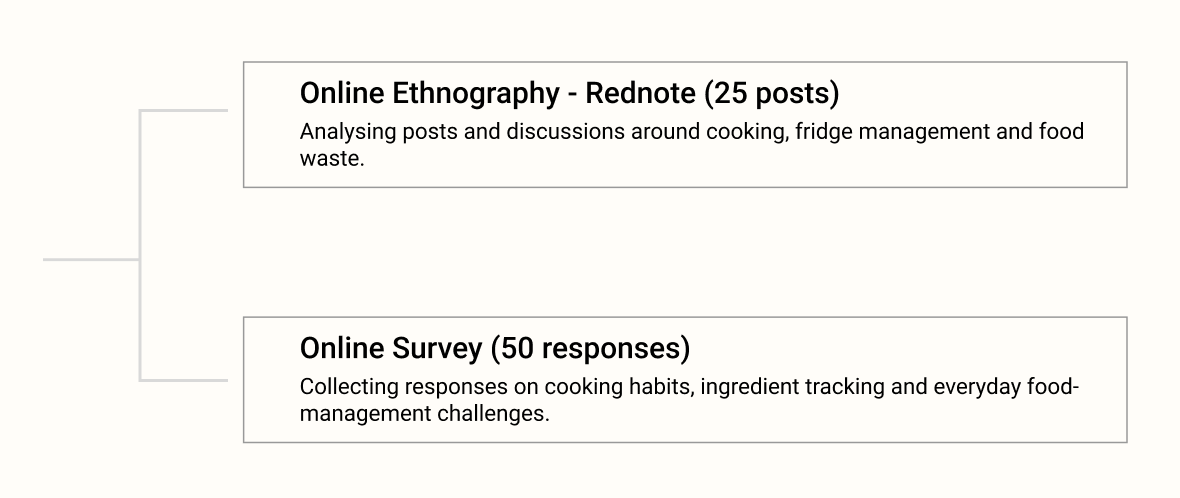
User research was conducted to understand how young people manage ingredients, decide what to cook and deal with food waste in everyday life. Insights were gathered through online ethnography and an online survey.

Fridge2Table user research methods

05. Thematic Analysis

Theme 1 - Convenience

Users value cooking at home but prioritise convenience and low effort.

Theme 2 - Meal Decision Fatigue

Deciding what to cook can add unnecessary mental effort to everyday meals.

Theme 3 - Low Fridge Visibility

Food stored in the fridge can easily be forgotten without a visible inventory.

Theme 4 - Expiry & Food Waste

Expiry management is often reactive rather than proactive.

Theme 5 - DIY Food Management Workarounds

Users already create simple tracking systems, so a digital solution must minimise manual input.


06. Wireflow

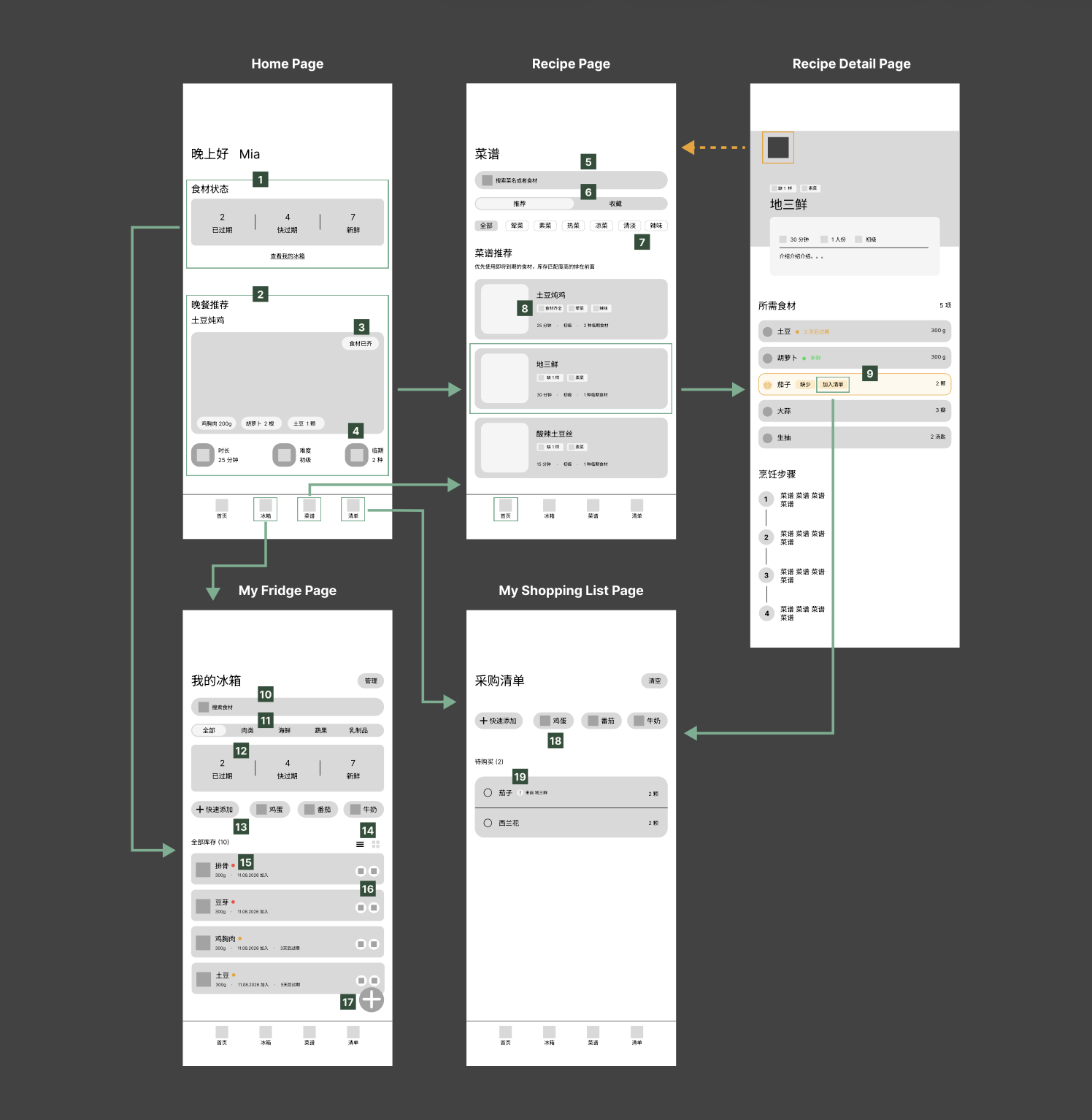
Fridge2Table wireflow

01. Home

01. Ingredient Status: Shows expired, expiring soon and fresh ingredients.

02. Recipe Recommendation: Recommends recipes that use the most expiring ingredients.

03. Ingredients Ready: Highlights recipes that can be made with available ingredients.

04. Expiring Ingredients: Shows how many expiring ingredients the recipe uses.

02. Recipe

05. Recipe Search: Search recipes by keyword or ingredient.

06. Recommended / Saved: Switch between recommended and saved recipes.

07. Ingredients Ready: Highlights recipes that can be made with available ingredients.

08. Taste Filters: Filter recipes by taste preference.

03. Recipe Details

09. Add to Shopping List: Add missing recipe ingredients directly to the shopping list.

04. Fridge

10. Fridge Search: Quickly search ingredients in the fridge.

11. Ingredient Categories: Filter ingredients by category.

12. Ingredient Status Summary: Shows expired, expiring soon and fresh items.

13. Quick Add: Quickly add frequently used ingredients.

14. List / Grid View: Switch between list and grid layouts.

15. Expiry Colour Coding: Red = expired, orange = expiring soon, green = fresh.

16. Edit / Delete: Edit or remove fridge items.

17. Add Ingredient: Access more ways to add ingredients.

05. Shopping List

18. Shopping Shortcuts: Quickly add common items to the shopping list.

19. Recipe Source: Shows which recipe an ingredient was added for.


07. User Testing

5 participants · Prototype usability test

The prototype was tested with five target users to evaluate the cooking flow, ingredient management and interaction feedback.

60%

Unsure what to do after cooking

60%

Wanted an easier way to add missing ingredients

Key Findings:

01 / Unclear cooking endpoint

3/5 users were unsure what to do after completing a recipe.

02 / Missing quantity issue

Users found that ingredients without a quantity could not be accurately deducted after cooking.

03 / Action feedback

Users needed clearer feedback to confirm when an action was completed successfully.

Design Responds:

01 / Added a “Finish Cooking” button

A clear action was added at the end of the recipe to help users understand how to complete the cooking flow.

02 / Added stock confirmation

After cooking, users are asked whether the ingredient is still available in the fridge.

03 / Strengthened error feedback

To help users recognise and recover from mistakes.